시작하기
이 페이지에서는 tspec을 사용하여 TypeScript 타입으로부터 OpenAPI Specification을 생성하고 Swagger UI로 제공하는 방법을 알아봅니다.
설치
Node.js와 TypeScript가 설치되어 있다고 가정하고, 새 TypeScript 프로젝트를 생성합니다:
bash
mkdir my-project
cd my-project
그런 다음 tsconfig.json을 초기화합니다:
bash
tsc --init이제 package.json을 초기화하고 tspec을 설치합니다:
bash
yarn init -y
yarn add tspec
bash
npm init -y
npm install tspec
bash
pnpm init -y
pnpm add tspec
ApiSpec 정의
Tspec은 프레임워크에 따라 여러 가지 방법으로 API 스펙을 정의할 수 있습니다.
ts
import { Tspec } from "tspec";

/** JSDoc으로 정의된 스키마 설명 */
interface Book {
  /** JSDoc으로 정의된 필드 설명 */
  id: number;
  title: string;
  description?: string;
}

export type BookApiSpec = Tspec.DefineApiSpec<{
  paths: {
    '/books/{id}': {
      get: {
        summary: 'ID로 책 조회',
        path: { id: number },
        responses: { 200: Book },
      },
    },
  }
}>;
ts
import { Request, Response } from 'express';
import { Tspec } from 'tspec';

interface Book {
  id: number;
  title: string;
}

// 타입이 지정된 파라미터로 Express 핸들러 정의
export const getBook = async (
  req: Request<{ id: string }>,
  res: Response<Book>,
) => {
  res.json({ id: Number(req.params.id), title: 'Book Title' });
};

// handler 타입을 사용하여 파라미터와 응답을 자동 생성
export type BookApiSpec = Tspec.DefineApiSpec<{
  paths: {
    '/books/{id}': {
      get: {
        summary: 'ID로 책 조회',
        handler: typeof getBook,
      },
    },
  },
}>;
ts
import { Controller, Get, Param } from '@nestjs/common';

interface Book {
  id: number;
  title: string;
}

/**
 * Books API 컨트롤러
 */
@Controller('books')
export class BooksController {
  /**
   * ID로 단일 책 조회
   * @summary ID로 책 조회
   */
  @Get(':id')
  findOne(@Param('id') id: string): Promise<Book> {
    return Promise.resolve({ id: Number(id), title: 'Book Title' });
  }
}

// ApiSpec을 수동으로 정의할 필요 없음!
// `tspec generate --nestjs`로 OpenAPI 스펙 생성
OpenAPI 스펙 생성
이제 OpenAPI 스펙을 생성합니다:
bash
npx tspec generate --outputPath openapi.jsonbash
npx tspec generate --nestjs --outputPath openapi.jsonTIP
- 기본 / Express: Tspec은
**/*.ts와 일치하는 모든 파일에서Tspec.DefineApiSpec을 자동으로 파싱합니다. - NestJS:
--nestjs플래그를 사용하여 컨트롤러를 직접 파싱합니다. 기본 glob은src/**/*.controller.ts입니다. - 자세한 내용은 Express 연동과 NestJS 연동을 참조하세요.
생성된 OpenAPI 스펙
(가독성을 위해 생성된 OpenAPI 스펙은 yaml 형식으로 표시됩니다)
yaml
openapi: 3.0.3
info:
  title: Tspec API
  version: 0.0.1
paths:
  /books/{id}:
    get:
      operationId: BookApiSpec_get_/books/{id}
      tags:
        - Book
      summary: ID로 책 조회
      parameters:
        - name: id
          in: path
          required: true
          schema:
            type: number
      responses:
        '200':
          description: OK
          content:
            application/json:
              schema:
                $ref: '#/components/schemas/Book'
components:
  schemas:
    Book:
      description: JSDoc으로 정의된 스키마 설명
      type: object
      properties:
        id:
          description: JSDoc으로 정의된 필드 설명
          type: number
        title:
          type: string
        description:
          type: string
      required:
        - id
        - title
OpenAPI 스펙 서빙
이제 Swagger UI로 OpenAPI 스펙을 서빙합니다:
bash
yarn tspec server --port 3000bash
npx tspec server --port 3000bash
pnpm tspec server --port 3000그런 다음 브라우저에서 http://localhost:3000/docs를 엽니다.
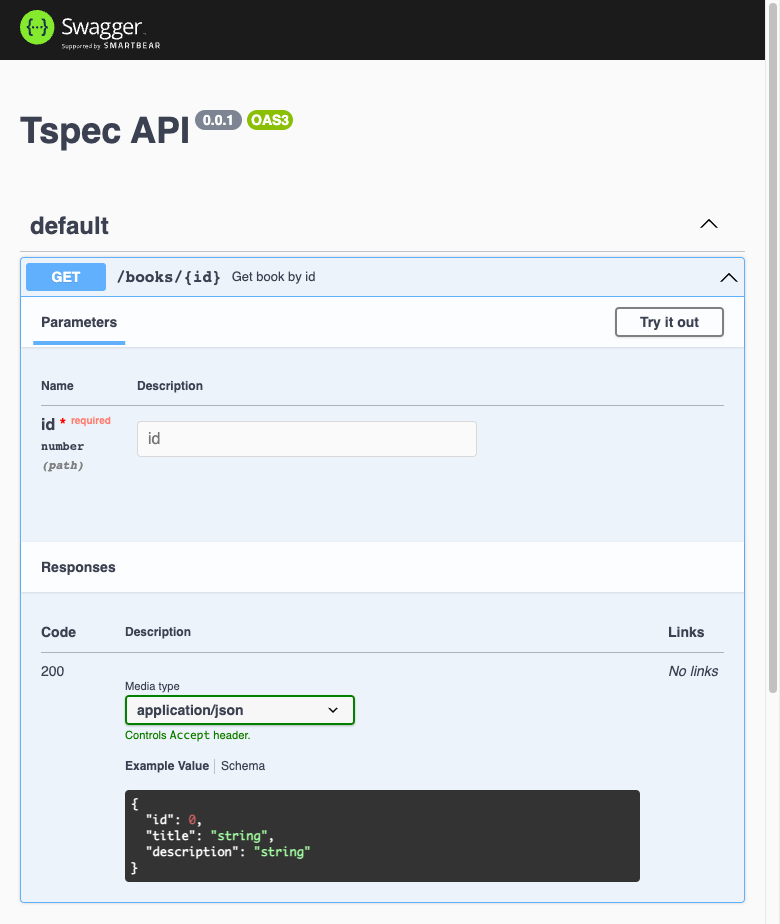
Swagger UI 페이지가 표시됩니다:
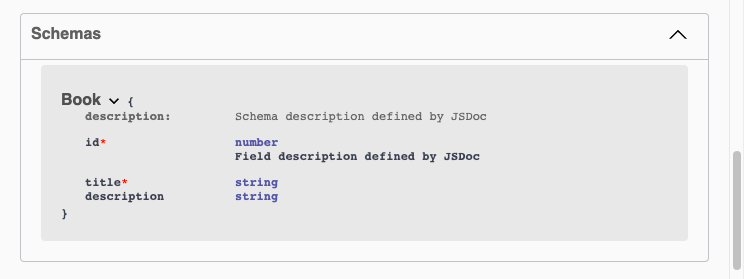
Schemas 탭에서 스키마 정의를 확인할 수 있습니다.